Quick Answer:
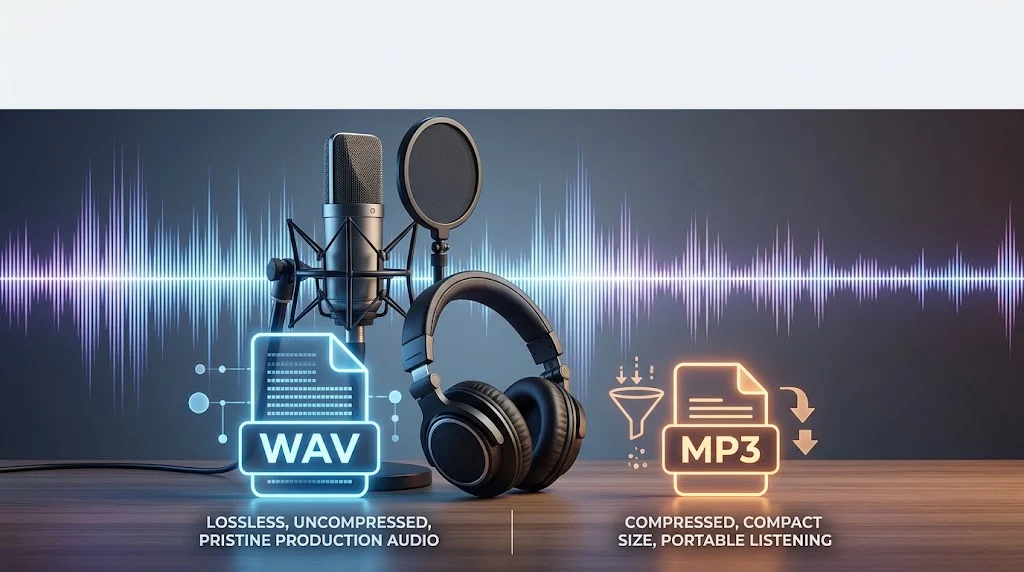
WAV is best when you want high-quality, uncompressed audio for editing or professional work. MP3 is best when you want smaller files that are easy to store, share, and play.
Have you ever downloaded an audio file and wondered whether WAV or MP3 is the better choice? You are not alone. These two audio formats are among the most familiar file types, yet they serve very different purposes. One focuses on preserving audio data, while the other is designed to make files much smaller and easier to store or share.
This can make the choice confusing when you are editing music, uploading a recording, saving a podcast, or simply choosing a format for everyday listening. Understanding the difference can save storage space and help you avoid losing audio quality when it matters. In this guide, we will compare WAV and MP3 in simple terms, explain how each format works, and show exactly when you should choose one over the other.
The Origin of WAV or MP3
WAV and MP3 were created with different goals in mind.
WAV, short for Waveform Audio File Format, is closely associated with Microsoft and IBM. It became widely used on computers as a way to store digital audio. WAV files commonly contain uncompressed PCM audio, which means the recorded sound data can be preserved without the kind of data reduction used by MP3.
The format is popular in music production, sound editing, recording, broadcasting, and other situations where maintaining audio data is important.
MP3, on the other hand, came from the MPEG audio standards developed through work involving the Moving Picture Experts Group. The format became famous because it could reduce audio file sizes dramatically while keeping the result reasonably good for everyday listening.
The key idea behind MP3 is lossy compression. It removes some audio information that listeners are less likely to notice. This makes the resulting file much smaller than an equivalent uncompressed recording.
So, the formats were built around different priorities:
WAV = preserve audio data
MP3 = reduce file size
That basic difference explains most of the advantages and disadvantages of each format.
WAV vs MP3: What Is the Main Difference?
The biggest difference is how the audio is stored.
A typical WAV file uses uncompressed audio, although the WAV container can support different types of audio data. Because uncompressed recordings keep much more original information, the files can become large.
MP3 uses lossy compression. During encoding, some audio information is removed to reduce the file size. The amount of compression can vary, and higher-quality MP3 settings generally preserve more audible detail while producing larger files.
For example, imagine recording the same song for a studio project.
A WAV version may take hundreds of megabytes depending on the recording length, sample rate, bit depth, and number of channels. An MP3 version of the same audio may be only a fraction of that size.
This difference matters when you are deciding between audio quality and convenience.
If you are editing the original recording, WAV is usually the better starting point.
If you simply want to listen to the finished track on a phone, MP3 may be much more practical.
British English vs American English Usage
Unlike spelling questions such as colour and color, WAV and MP3 do not have British and American spelling differences.
The abbreviations remain the same in both varieties of English.
| Term | British English | American English | Standard Form |
|---|---|---|---|
| WAV audio | WAV | WAV | WAV |
| MP3 audio | MP3 | MP3 | MP3 |
| WAV file | WAV file | WAV file | WAV file |
| MP3 file | MP3 file | MP3 file | MP3 file |
| Audio format | Audio format | Audio format | Audio format |
The difference is not regional spelling. It is a difference in audio technology and file characteristics.
Whether your readers are in the UK, US, Canada, Australia, or another English-speaking country, the terms WAV and MP3 remain unchanged.
Why Is There Confusion Between WAV and MP3?
The confusion usually comes from the fact that both formats can contain the same basic type of content: digital audio.
A song can exist as a WAV file or an MP3 file. A voice recording can also be saved in either format. This can make the two seem interchangeable.
They are not identical, however.
One common misunderstanding is that WAV is always “better” and MP3 is always “bad.” That is too simple. WAV can preserve more audio information, but that does not automatically make it the best choice for every situation.
Another source of confusion is file size. Someone may see that a WAV file is much larger and assume something is wrong with it. In reality, the larger size is often a direct result of storing audio with little or no compression.
People also become confused by terms such as bitrate, sample rate, lossless, and lossy. These technical words can make a simple file-format decision sound harder than it really is.
The practical question is easier:
Do you need maximum flexibility and audio data for editing, or do you need a small and convenient file for listening and sharing?
Which Format Should You Use?
Your choice should depend on what you plan to do with the audio.
Choose WAV when:
- You are recording music for editing
- You are producing a podcast
- You need to process audio several times
- You are working with professional sound
- You want to keep a high-quality master copy
- You need an editing-friendly source file
- Storage space is not your main concern
WAV is especially useful during production because repeated processing and exporting can introduce quality loss when lossy formats are repeatedly used.
Choose MP3 when:
- You want small audio files
- You are sharing recordings online
- You need to save storage space
- You are listening on a phone or computer
- You are building a portable music collection
- You need broad compatibility
- You are sending audio through a messaging service
For everyday listening, MP3 can be an extremely practical choice.
A useful workflow is to keep the original high-quality audio and create MP3 copies when you need smaller files.
Common Mistakes with WAV or MP3
One common mistake is assuming that converting an MP3 into WAV restores the original audio quality.
It does not.
If an MP3 has already removed audio information through lossy compression, converting it to WAV does not bring that missing information back. The resulting WAV may be larger, but it does not magically become the original-quality recording.
Another mistake is repeatedly converting between lossy formats.
For example:
MP3 → another MP3 → another compressed format
Each lossy conversion can potentially reduce quality further.
A better approach is to keep a high-quality original and create compressed versions from that source.
Another common misunderstanding is believing that every WAV file has exactly the same quality. WAV is a container format, and the audio inside it can have different technical properties.
The same applies to MP3. Two MP3 files can sound different depending on how they were encoded and what settings were used.
WAV or MP3 in Everyday Examples
The best format can change depending on the situation.
Music production:
A producer records vocals and instruments as WAV files before editing and mixing.
Podcast production:
An editor may work with WAV recordings during production and later create a smaller MP3 version for distribution.
Online sharing:
Someone sends an MP3 because the smaller file is easier to upload or download.
Voice recording:
A person making a casual voice memo may prefer a compressed format because storage space matters more than maximum quality.
Archiving:
Someone preserving an important original recording may choose a high-quality WAV or another suitable lossless format.
Everyday listening:
A listener may choose MP3 because it provides convenient file sizes and works across many devices and applications.
The important point is that there is no universal winner.
The right format depends on the job.
Audio Quality: Is WAV Always Better Than MP3?
When comparing an uncompressed WAV file with a lossy MP3 made from the same source, the WAV generally retains more of the original audio information.
But more data does not always mean a listener will hear a dramatic difference.
A high-quality MP3 can sound very good, especially when played through ordinary headphones, speakers, or mobile devices.
The difference becomes more important when audio is being edited, processed, mixed, mastered, or repeatedly converted.
Think of WAV as a strong source file and MP3 as a convenient delivery format.
For production, keeping the original high-quality recording gives you more flexibility.
For listening, a well-encoded MP3 may provide an excellent balance between sound quality and file size.
File Size and Storage Differences
File size is one of the clearest differences between WAV and MP3.
WAV files can become large because uncompressed audio requires much more storage.
MP3 files are smaller because compression removes some audio information.
For someone storing thousands of songs, this difference can become significant. Smaller files use less disk space and are faster to upload or transfer.
However, storage is not always the deciding factor.
If you are working on a professional recording project, saving space may be less important than preserving the original audio.
A smart approach is to use each format for its strength:
WAV for the master or working copy.
MP3 for convenient distribution and everyday listening.
Compatibility and Practical Use
MP3 has become one of the most widely recognized digital audio formats. Its small file size and long history of support make it useful across many devices and applications.
WAV is also widely supported, particularly in audio production software, recording applications, editing programs, and computer-based workflows.
The question is therefore not simply whether a device can play the file.
You should also consider what you need to do with it.
If the file is going into an editing project, WAV may be more suitable.
If the file is being uploaded, shared, or stored on a device with limited space, MP3 may be more convenient.
Comparison Table – WAV vs MP3
| Feature | WAV | MP3 |
|---|---|---|
| Compression | Usually uncompressed | Lossy compression |
| File size | Large | Much smaller |
| Audio data | Can preserve original PCM data | Some information removed |
| Editing | Excellent for production | Less ideal as a working master |
| Sharing | Less convenient | Very convenient |
| Storage | Requires more space | Saves space |
| Everyday listening | Useful but often oversized | Highly practical |
| Professional recording | Common choice | Usually not the first choice for recording masters |
| Quality flexibility | Depends on WAV audio settings | Depends on bitrate and encoding |
| Best use | Recording, editing, mastering | Listening, sharing, portable storage |
Search Intent and Usage Behavior
People searching for wav or mp3 usually have a practical question rather than a purely technical one.
They may want to know which format sounds better, which one takes less space, which format is best for music, or which file type they should use for recording and editing.
Another common search behavior is comparison-based research. Users often search for phrases such as WAV vs MP3, MP3 or WAV for recording, WAV or MP3 for music, and which audio format is better.
These searches reveal an important pattern: people usually want a quick decision before they want technical detail.
That is why the simplest answer is often the most useful:
Use WAV for high-quality source audio and production work. Use MP3 when smaller files and easy sharing matter more.
FAQs
Is WAV better than MP3?
WAV is generally better when preserving audio data and editing flexibility are important because it can store uncompressed audio. MP3 is better for convenience because compression makes files much smaller. For everyday listening, a good-quality MP3 can still sound excellent.
Is MP3 better than WAV for music?
MP3 can be better for everyday music listening when storage space and easy sharing matter. WAV is usually preferable for production, editing, mixing, or keeping a high-quality master. The better choice depends on whether convenience or audio preservation is your priority.
Does converting MP3 to WAV improve quality?
No. Converting an MP3 to WAV can make the file larger, but it cannot restore audio information already removed during MP3 compression. If you need the best source quality, start with the original recording or another high-quality source rather than converting an MP3.
Which is smaller, WAV or MP3?
MP3 files are normally much smaller than WAV files because MP3 uses lossy compression to reduce the amount of stored audio data. WAV files commonly contain uncompressed audio, so they require considerably more storage for the same recording length.
Which format is best for recording?
WAV is usually a strong choice for recording when you plan to edit, mix, process, or archive the audio. It can preserve high-quality uncompressed audio, giving you a better working source. MP3 is more suitable when small file size is the main goal.
Should I upload WAV or MP3?
The best format depends on the platform and purpose. If a service accepts and benefits from high-quality source audio, WAV may be preferable. If the platform emphasizes smaller uploads or ordinary listening, MP3 can be more practical. Always check the platform’s requirements.
Can WAV and MP3 have the same audio quality?
They can represent the same recording, but their stored audio data may differ. An uncompressed WAV can preserve more original information, while MP3 removes some information through compression. A high-quality MP3 may still sound very close to the source.
Which format should I keep for my original recordings?
For important original recordings, keeping a high-quality WAV or another suitable lossless master is generally a better long-term approach than keeping only an MP3. You can later create smaller MP3 copies from the original without starting with an already compressed source.
Conclusion
Choosing between WAV or MP3 becomes much easier once you understand what each format is designed to do. WAV is a strong choice for recording, editing, production, and keeping high-quality source audio. MP3 is designed around convenience, offering much smaller files that are easy to store, share, and play.
Neither format is automatically the best for every situation. If you are creating or preserving important audio, keep a high-quality original. If you simply want practical files for everyday listening, MP3 can be an excellent choice. The simple rule to remember is this: WAV prioritizes audio data, while MP3 prioritizes smaller file size and convenience.
Read More Related Articles:
- Empathetic or Empathic | What’s the Difference and Which …
- Intel or Ryzen| Which CPU Is Better in 2026? Complete …
- Narita or Haneda| Which Tokyo Airport Should You …